
One question the recording studio owner often asks themself is "Do I need dual monitors for my studio"? We think you do - read further to find out why dual monitors may be a great investment for your studio.
Look at these dual Mac monitors. Can't you imagine yourself with them?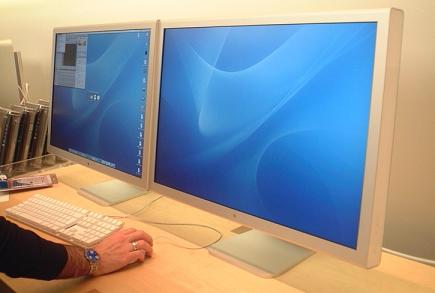
Most of us do our music recording with a computer. My guess is the majority of people use a desktop computer because they are generally more powerful than a laptop of similar price. Finally flat panel LCD computer monitors have come down so far in price that most people have them. Flat LCD's take up less space than their CRT counterparts, and usually have a larger viewable space when comparing a LCD and CRT of the same size.
Most people only have a single display monitor for their recording setup. There is something about running dual monitors that mystifies most people. I know many studio owners who can build a computer from scratch but for some reason are hesitant to setup two monitors because they think it could be hard.
Luckily, setting up dual monitors in your studio is much easier than you may think. Many new desktop computers already have the hardware to support dual monitors. Look at your video card. Does it have a VGA and a DVI connection? Does it have two VGA or two DVI connections? If you answered yes to any of these questions, then you should be able to easily get a dual monitor setup. Take a look at this picture to see a video card with both a VGA and a DVI connection:
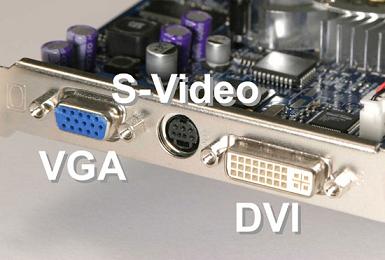
If your computer has a built in video card on the motherboard, you may not be setup for dual monitors. If that is the case, you can buy a new video card for quite cheap from many online retailers. Check out one of our favorite sites to buy computer stuff - newegg.com. They have good prices, have always treated us well,fast shipping, and a good return policy. Check the reviews on there and get a well reviewed card.
Once you have an appropriate video card, you need two monitors. I recommend getting two LCD monitors - forget about the large CRT monitors. If you look around you can get some great deals on flat panel monitors. I picked up two decent 19" LCD's for around $350 total. You probably don't have to worry about things like refresh rate or ultra-sharp if you are only going to be using the monitors for your recording studio. Those features are more important if you are a gamer and need the graphics to be really sharp and be displayed quickly without ghosting.
If you use a laptop computer for your recording studio you are probably all set to use dual monitors. As a matter of fact, I'm writing this article using my laptop with a 21" Dell LCD ultra-sharp monitor setup as a second monitor. It's great! Most laptops already have a VGA or DVI port built into them, so all you have to do is plug in your second monitor and configure Windows to use it, and you are all set.
So, why do you want a dual monitor setup in your studio? When you have two monitors, you put them side by side, effectively doubling your desktop space. Imagine this - on your left flat screen monitor, you have your DAW editing/recording windo. You can see all the tracks you are recording or playing back. THEN, on your right monitor you have your mix screen from the DAW open where you can adjust levels, add effects, pan left and right, and more. You don't need to click back and forth between the views - they both are open. With dual monitors you can even drag something from one monitor to another. It is really like having one big monitor, but much cheaper.
I hope this article will encourage some of you to go out there and experiment with dual monitors. As always, let us know if you do and how it goes. Until next time!